
How to Secure Your Website in 2026
How to Secure Your Website in 2026: A Complete Website Security Guide
Website security in 2026 is no longer about installing a security plugin and hoping it blocks attackers. Modern websites need multiple layers of protection covering WordPress, hosting, user accounts, databases, APIs, backups, authentication, malware detection, and server configuration. In this guide, you will learn how to secure your website properly, reduce common attack risks, and build a security strategy that can protect your website before, during, and after an attack.
The safest way to secure a website in 2026 is to use multiple security layers instead of relying on one plugin or tool. Keep your CMS and software updated, use strong unique passwords and MFA, protect the hosting account, enable HTTPS, limit administrator access, maintain tested backups, use a Web Application Firewall, monitor the website, secure APIs, remove unused software, and have a recovery plan ready before an incident happens.
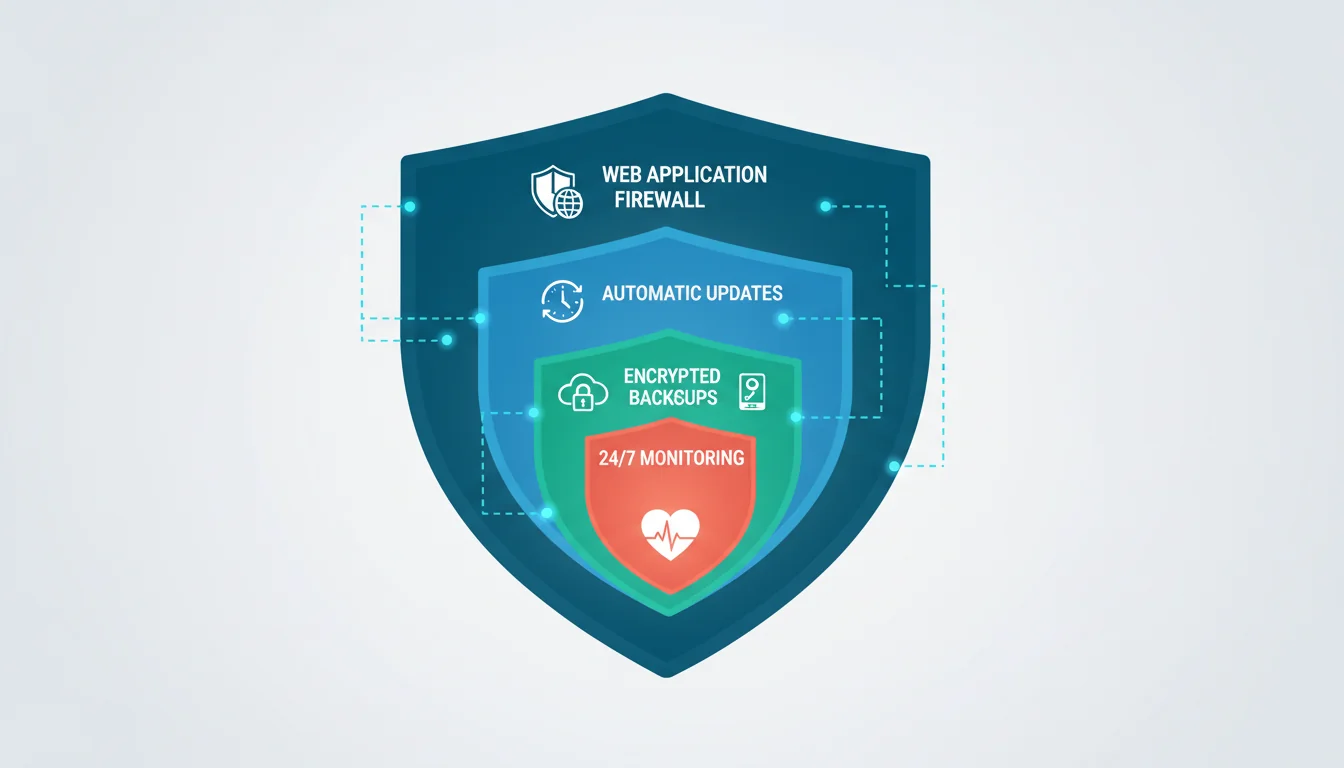
Table of Contents
- Why Website Security Matters in 2026
- The Website Security Layers You Need
- Keep WordPress and Software Updated
- Use Strong Passwords and Multi-Factor Authentication
- Protect WordPress Administrator Accounts
- Secure Your Hosting and Server
- Enable HTTPS and Secure Connections
- Use a Web Application Firewall
- Create Reliable and Tested Backups
- Remove Unused Plugins, Themes, and Software
- Secure File and Database Permissions
- Improve Security With HTTP Headers
- Secure APIs and Third-Party Integrations
- Detect Malware and Suspicious Activity
- Monitor Your Website Continuously
- What to Do If Your Website Gets Hacked
- Website Security Checklist for 2026
- Frequently Asked Questions
Why Website Security Matters in 2026
A website is no longer just a collection of pages and images. Modern websites often connect databases, payment gateways, APIs, analytics systems, email services, customer accounts, cloud platforms, and third-party applications.
This creates more opportunities for attackers. A vulnerability in a plugin, stolen administrator password, compromised hosting account, exposed API key, or outdated server component can become an entry point into the website.
Website security is therefore not a single task that you complete once. It is an ongoing process of reducing attack surfaces, detecting suspicious activity, updating software, and preparing for recovery.
What Can Happen If a Website Is Not Secure?
- Attackers can inject malicious code into pages.
- Customer or administrator accounts can be compromised.
- Sensitive database information can be exposed.
- The website can be used to distribute malware.
- Attackers can create spam pages or malicious redirects.
- E-commerce websites can suffer financial losses.
- Search engines can detect and flag compromised pages.
- The website can be taken offline through destructive attacks.
No website can be guaranteed to be completely immune from attacks. The goal of a good security strategy is to reduce the probability of compromise, limit the damage if an attack happens, detect incidents quickly, and recover reliably.
The Website Security Layers You Need
One of the biggest security mistakes is depending on a single solution. Installing a security plugin does not automatically secure the server, hosting account, database, administrator accounts, or third-party services.
A stronger approach is to build multiple independent security layers.
Layer 1: Account Security
Protect administrator, hosting, database, email, and third-party service accounts using unique passwords and multi-factor authentication.
Layer 2: Application Security
Keep WordPress, plugins, themes, frameworks, libraries, and custom code updated and properly configured.
Layer 3: Server Security
Secure SSH, FTP, hosting panels, databases, file permissions, server software, and operating system components.
Layer 4: Network Protection
Use HTTPS, firewalls, rate limiting, DNS protection, and other network-level controls where appropriate.
Layer 5: Detection and Recovery
Maintain backups, logging, monitoring, malware detection, and an incident response plan.
Keep WordPress and Software Updated
Outdated software is one of the most common security problems on websites. Attackers actively search for known vulnerabilities in outdated CMS versions, plugins, themes, libraries, and server software.
If a security update is released for software running on your website, delaying the update increases the amount of time available for attackers to exploit a known vulnerability.
What Should You Keep Updated?
- WordPress core.
- WordPress plugins.
- WordPress themes.
- PHP and other server-side runtimes.
- Web server software.
- JavaScript libraries.
- Frameworks and dependencies.
- Operating system security updates.
Before applying major updates to an important production website, maintain a recent backup and, when possible, test significant changes on a staging environment.
Use Strong Passwords and Multi-Factor Authentication
A strong website can still be compromised if an administrator uses a weak or reused password.
Every important account should use a unique password. This includes WordPress administrators, hosting panels, email accounts, domain registrars, databases, Git repositories, cloud services, and third-party platforms.
Enable Multi-Factor Authentication
Multi-factor authentication adds another verification step after the password. This makes stolen passwords significantly less useful to attackers when the additional authentication factor remains protected.
Prioritize MFA for administrator, hosting, domain, email, and other high-privilege accounts.
Never use the same password for WordPress, hosting, email, and your domain registrar. A compromise of one account should not automatically expose every other system.
Protect WordPress Administrator Accounts
Administrator accounts have enough privileges to install software, modify website content, change settings, and potentially execute dangerous actions.
Protecting these accounts should therefore be one of the highest priorities in your WordPress security strategy.
Follow the Principle of Least Privilege
Give users only the permissions they actually need. A content editor does not normally need administrator privileges, and a developer who only manages content should not automatically receive access to the hosting account.
- Remove unused administrator accounts.
- Use unique administrator passwords.
- Enable MFA.
- Review user roles regularly.
- Remove accounts belonging to people who no longer need access.
- Avoid sharing administrator credentials between multiple people.
Secure Your Hosting and Server
Website security does not stop at WordPress. If the hosting account or server is compromised, an attacker may be able to bypass application security controls completely.
Important Hosting Security Controls
- Enable MFA for the hosting control panel.
- Use secure SSH keys instead of passwords where appropriate.
- Disable unused services and protocols.
- Keep the operating system and server software updated.
- Restrict database access when possible.
- Use secure file transfer methods such as SFTP instead of plain FTP.
- Review server logs for suspicious activity.
- Use separate accounts and permissions for different services.
If you use managed hosting, ask the provider what server-level security, backup, firewall, malware scanning, and incident-response features are included in your plan.
Enable HTTPS and Secure Connections
HTTPS encrypts communication between visitors and the website and helps protect information while it travels across the network.
Every modern website should use HTTPS, especially websites that handle logins, forms, customer information, payments, or other sensitive data.
Check Your HTTPS Configuration
- The website should load correctly over HTTPS.
- HTTP traffic should normally redirect to HTTPS.
- Avoid mixed-content warnings.
- Keep certificates valid and properly configured.
- Review TLS configuration on the server.
HTTPS is essential, but it does not protect a website from vulnerable plugins, stolen passwords, malware, SQL injection, or compromised administrator accounts by itself.
Use a Web Application Firewall
A Web Application Firewall, commonly called a WAF, can inspect incoming HTTP requests and block or challenge traffic that matches known malicious patterns.
A WAF can provide an additional defensive layer against attacks such as malicious requests, automated abuse, vulnerability scanning, and some common web application attack patterns.
However, a WAF should be treated as one layer of security rather than a replacement for secure code, updates, authentication, backups, and proper server configuration.
If an administrator password is stolen or a vulnerable plugin allows an authenticated attacker to execute dangerous actions, a firewall may not prevent every possible attack.
Create Reliable and Tested Backups
Backups are one of the most important parts of website security because prevention is not always enough. If an attacker successfully compromises the website, you need a reliable way to restore a clean version.
A Good Backup Strategy Should Include
- Website files.
- Database backups.
- Uploaded media.
- Important configuration files.
- Off-site or independently stored copies.
Test Your Backups
A backup that has never been restored should not automatically be considered reliable.
Test restoration periodically on a staging environment or another controlled environment. Confirm that the files, database, media, configuration, and critical website functionality can actually be recovered.
Backups are part of security only when they are available, protected from compromise, and actually restorable.
Remove Unused Plugins, Themes, and Software
Every additional component installed on a website increases its potential attack surface.
If a plugin or theme is installed but not being used, there is often little reason to keep it active on a production website. An abandoned or vulnerable component can become a security liability.
- Remove unused plugins.
- Remove unused themes.
- Delete abandoned scripts and libraries.
- Avoid pirated or nulled plugins and themes.
- Download software from trusted sources.
- Review plugins that have not received updates for a long time.
Do not install a large number of security plugins simply because they advertise different features. Multiple plugins performing overlapping security functions can introduce configuration conflicts and additional maintenance requirements.
Secure File and Database Permissions
Incorrect file permissions can allow unauthorized users or processes to modify files that should be protected.
File permissions should follow the hosting environment's security model and should be as restrictive as practical while allowing the website to function correctly.
Avoid Dangerous Permission Configurations
Do not solve website permission problems by blindly assigning
world-writable permissions such as 777. This can create
unnecessary security exposure.
Database credentials should also be protected and should not be exposed inside publicly accessible files, repositories, logs, or frontend JavaScript.
Improve Security With HTTP Headers
Security-related HTTP headers can help browsers apply additional restrictions to website behavior.
Important Security Headers to Review
- Content-Security-Policy.
- Strict-Transport-Security.
- X-Content-Type-Options.
- Referrer-Policy.
- Permissions-Policy.
Security headers should be configured according to the website's actual requirements. For example, an overly restrictive Content Security Policy can break legitimate scripts, payment systems, analytics, or third-party integrations if it is implemented without testing.
Do not copy a random security-header configuration and add it to production without testing. Security configuration should improve protection without breaking required website functionality.
Secure APIs and Third-Party Integrations
Modern websites depend heavily on APIs. WordPress websites may connect to payment gateways, shipping systems, CRMs, analytics platforms, email services, mobile applications, and external databases.
Every integration should be treated as another security boundary.
API Security Checklist
- Authenticate API requests properly.
- Use authorization rules instead of relying only on authentication.
- Limit API permissions to what is required.
- Protect API keys and secret credentials.
- Never expose private API secrets in frontend JavaScript.
- Apply rate limiting where appropriate.
- Validate and sanitize incoming data.
- Log important security events without exposing sensitive information.
Detect Malware and Suspicious Activity
Prevention is only one part of website security. You also need to know when something suspicious happens.
Malware scanners and security monitoring systems can help identify suspicious files, unexpected changes, malicious code, unauthorized users, or other indicators of compromise.
Watch for Unexpected Changes
- New administrator accounts.
- Unknown plugins or themes.
- Modified PHP files.
- Unexpected JavaScript.
- Strange redirects.
- Unknown scheduled tasks.
- Unexpected server processes.
- Unusual outbound requests.
- Sudden spam pages or SEO content.
Monitor Your Website Continuously
Website security should not depend on someone discovering a problem weeks after the website was compromised.
Continuous monitoring can help you identify outages, unexpected changes, certificate problems, suspicious login activity, malware, performance anomalies, and other issues earlier.
What Should You Monitor?
- Website uptime.
- SSL certificate status.
- DNS changes.
- Administrator accounts.
- Important file changes.
- Server logs.
- Failed login attempts.
- Malware indicators.
- Search engine security warnings.
How to Secure an E-Commerce Website
E-commerce websites require additional security because they handle customer accounts, orders, payments, addresses, and other sensitive business information.
If you operate WooCommerce or another online store, security should include both the website and every connected payment, shipping, email, analytics, and customer-management system.
- Protect administrator accounts with MFA.
- Keep WooCommerce and payment integrations updated.
- Use HTTPS throughout the entire website.
- Restrict access to sensitive administration functions.
- Monitor unusual order and account activity.
- Protect payment gateway credentials and API keys.
- Keep reliable database backups.
- Review third-party integrations regularly.
What to Do If Your Website Gets Hacked
If you discover that your website has been compromised, do not start randomly deleting files or changing configuration without first understanding what happened.
Step 1: Contain the Incident
Limit further damage. Depending on the situation, this may include temporarily restricting access, disabling compromised accounts, or placing the website into maintenance mode.
Step 2: Protect Your Accounts
Change compromised credentials and review administrator, hosting, database, email, domain, and third-party service access.
Step 3: Identify the Entry Point
Investigate vulnerable plugins, stolen credentials, exposed services, malicious uploads, outdated software, or other possible entry points.
Step 4: Remove the Compromise
Remove malicious code and unauthorized access using a controlled recovery process. Simply deleting one suspicious file may not be enough if the attacker created another persistence mechanism.
Step 5: Restore From a Known-Clean Backup
If a verified clean backup exists, restoration can be safer than trying to manually clean every modified file.
Step 6: Monitor After Recovery
Continue monitoring the website after recovery to make sure the attacker no longer has access and the vulnerability has been fixed.
Website Security Priorities for 2026
| Security Area | Priority | Main Goal |
|---|---|---|
| MFA | Critical | Protect important accounts |
| Software Updates | Critical | Reduce known vulnerabilities |
| Backups | Critical | Recover after compromise |
| HTTPS | High | Protect connections |
| WAF | High | Filter malicious traffic |
| Monitoring | High | Detect suspicious activity |
| Least Privilege | High | Limit account capabilities |
| Security Headers | Medium | Add browser-side protections |
Website Security Checklist for 2026
Use the following checklist as a practical starting point for securing a WordPress or modern business website.
- Enable HTTPS.
- Enable MFA for administrator and critical accounts.
- Use unique passwords for every important service.
- Keep WordPress updated.
- Keep plugins and themes updated.
- Remove unused plugins and themes.
- Never use nulled or pirated software.
- Secure your hosting control panel.
- Secure SSH and SFTP access.
- Review file permissions.
- Protect database credentials.
- Use a WAF when appropriate.
- Configure security headers carefully.
- Protect APIs and API keys.
- Maintain automated backups.
- Store important backups separately from the production server.
- Test backup restoration.
- Monitor administrator accounts.
- Monitor important file changes.
- Monitor uptime and SSL status.
- Review server and application logs.
- Have a documented recovery plan.
Website Security Best Practices
- Treat security as an ongoing process, not a one-time installation.
- Use multiple independent security layers.
- Protect the highest-privilege accounts first.
- Keep software updated and remove unsupported components.
- Keep backups independent from the production environment.
- Test backups before you actually need them.
- Monitor the website instead of waiting for customers to report problems.
- Avoid copying security configurations without understanding their impact.
- Use staging environments for major security or server changes.
- Document how the website can be recovered after an incident.
Final Answer: How to Secure Your Website in 2026
The best way to secure a website in 2026 is not to search for one plugin that promises complete protection. Security works best as a layered system.
Start by protecting your accounts with strong unique passwords and MFA. Keep WordPress, plugins, themes, frameworks, and server software updated. Remove anything you no longer need and use the principle of least privilege.
Then secure the hosting environment, enable HTTPS, consider a WAF, protect APIs and credentials, configure appropriate security headers, and monitor important activity.
Finally, prepare for the possibility that prevention fails. Maintain protected backups, test restoration, monitor for compromise, and keep an incident-response procedure ready.
A secure website is not simply a website that has never been hacked. It is a website that is difficult to compromise, capable of detecting suspicious activity, and prepared to recover quickly when something goes wrong.
Frequently Asked Questions About Website Security in 2026
Use layered security. Enable HTTPS and MFA, keep your CMS and software updated, remove unused components, secure hosting and administrator accounts, use appropriate firewall protection, maintain tested backups, protect APIs, and monitor the website for suspicious activity.
No. A security plugin can provide useful application-level protection, but it cannot replace secure hosting, strong authentication, software updates, backups, server security, monitoring, and secure development practices.
Yes. Multi-factor authentication should be prioritized for administrator accounts and other high-value accounts such as hosting, email, domain, and cloud services.
The correct backup frequency depends on how frequently your website changes and how much data you can afford to lose. An e-commerce website with frequent orders may require much more frequent backups than a static informational website. Whatever schedule you choose, test restoration regularly.
HTTPS protects communication between the visitor and the website, but it does not protect against vulnerable plugins, stolen passwords, malware, insecure code, compromised hosting, or other application and server vulnerabilities.
No. A WAF can block or challenge many malicious requests, but it should be considered one layer of defense. Secure code, updates, authentication, backups, server security, and monitoring are still required.
First contain the incident and protect compromised accounts. Then investigate the entry point, remove unauthorized access, restore from a verified clean backup when appropriate, fix the vulnerability, and continue monitoring the website after recovery.
There is no single measure that secures every website. Strong authentication, timely security updates, reliable backups, least-privilege access, secure hosting, and continuous monitoring should work together as part of a layered security strategy.
Official Security Resources
Is Your Website Actually Secure?
Installing a security plugin is not the same thing as securing a website. Your WordPress installation, hosting account, administrator access, database, APIs, backups, and server configuration all need to be considered.
Start with the security checklist in this guide, identify the weakest layer in your website, and fix the highest-risk problems first.